
ORBIT Space System Pro Review (2026): A Premium Space Website Template Worth Considering
NebulaForge provided ORIVON with a review copy of ORBIT Space System Pro. This review was independently written and NebulaForge had no editorial control over our conclusions. This article contains affiliate links; ORIVON may earn a commission if you purchase through them, at no additional cost to you.
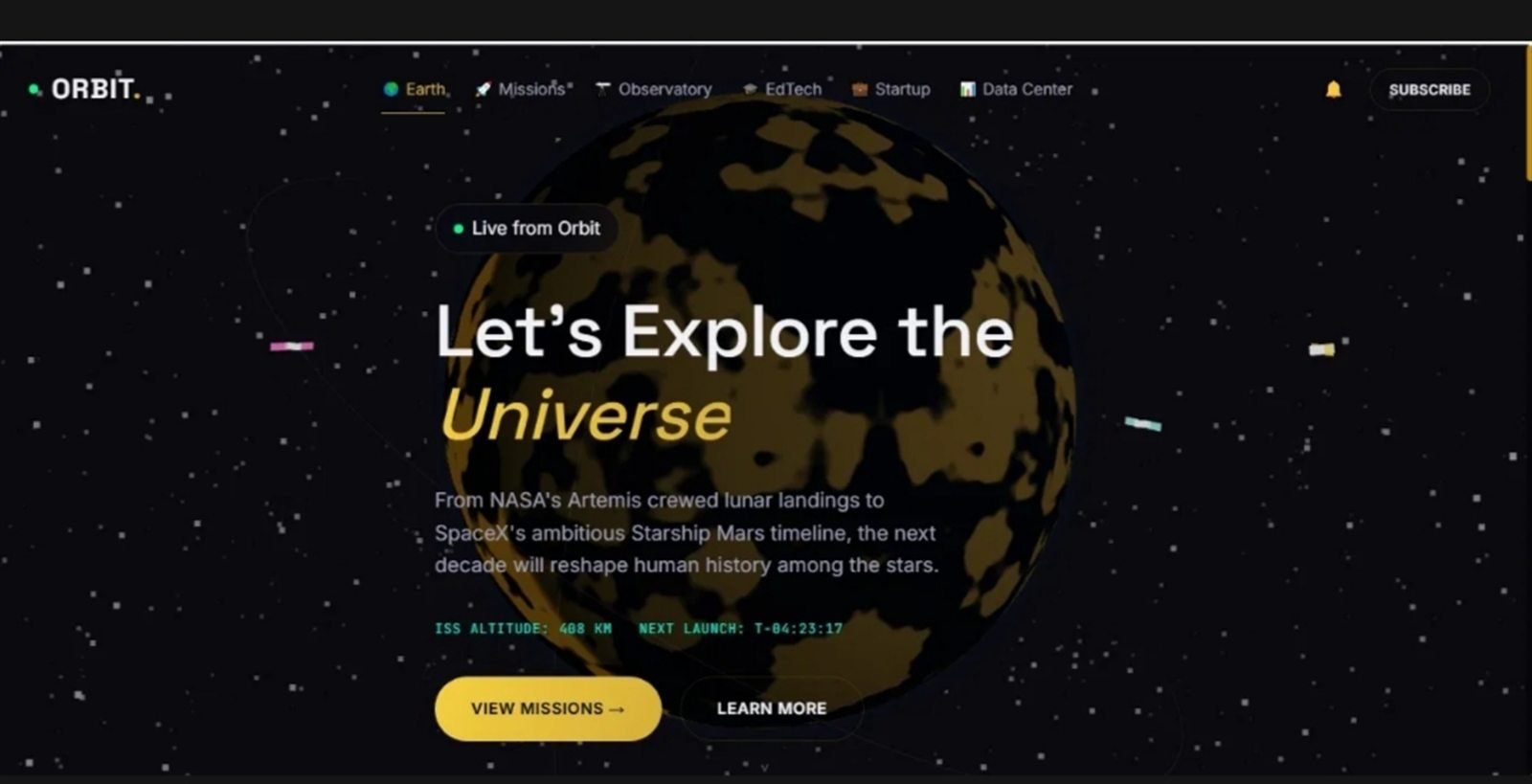
ORBIT's main frontend interface — a full-viewport Three.js Earth behind a mission-style hero section.
Most space website templates stop at a dark background, a rotating planet and a few generic landing-page sections. ORBIT Space System Pro, built by developer Shehab Essam under the name NebulaForge, is attempting something considerably more ambitious: 14 HTML page templates (including dedicated 404 and Coming Soon pages), built around its own dashboard, satellite interface, observatory-style sky map and data center for people making space-themed digital products rather than for a single homepage.
This review is based on the review copy NebulaForge supplied to ORIVON, cross-checked against the public live demo, the current sales page and the package's own documentation. We inspected the source files directly rather than taking the marketing copy at face value.
Quick Verdict
ORBIT is one of the more complete space-focused frontend templates we've seen. Its $120 price is higher than a basic HTML template, but for developers who actually plan to use its dashboards, Three.js elements and multi-page structure, the amount of frontend work already completed can justify the premium.
Best for: developers, space startups, astronomy/science education projects and creators who need a genuinely space-focused multi-page frontend.
Main strengths: package depth, a distinctive space-specific design system, working Three.js visuals, and a large amount of niche-specific frontend work already finished.
Main consideration: live data and backend services — satellite positions, launch schedules, authentication — need to be connected separately; ORBIT supplies the presentation layer, not a hosted service.
Verdict: recommended for the right buyer — someone who needs this specific type of frontend, not someone who only needs a single basic landing page.
What Is ORBIT Space System Pro?
ORBIT is a frontend template, sold and delivered as source code. What you're actually purchasing is the HTML, CSS and JavaScript that make up 14 pages, the design system tying them together, and a set of interactive components — a 3D Earth, dashboard widgets, charts and a sky map — that already work in a browser the moment you open them on a local server.
What you are not purchasing is a hosted satellite-tracking subscription, a managed backend, or live production data. There's no server, no database and no API key included. That's a meaningful distinction, but it's better understood as flexibility than as a shortfall: a template that shipped with someone else's backend baked in would be far less useful to a developer who already has their own data sources, hosting and architecture in mind. ORBIT hands you the presentation layer and gets out of the way.
What Do You Actually Get for $120?
The clearest way to describe the package is to separate what's finished from what a buyer is expected to bring. In the supplied review copy, that split looks like this:
| Included with ORBIT | You provide/connect |
|---|---|
| Complete frontend (14 HTML pages) | Backend / server |
| Full HTML/CSS/JavaScript source | Production database |
| Three.js 3D Earth, satellites, starfield | Live APIs (NASA, SpaceX, ISS, NOAA, etc.) |
| Dashboard & data-center interfaces | Authentication |
| Satellite / Mission Control-style UI | Production telemetry |
| Observatory / sky-map UI | Hosting |
| Responsive layouts, English + Arabic RTL | Final content, copy and imagery |
| Setup, customization and Three.js docs | Ongoing maintenance |
In the review copy, that's 14 HTML files in total — 12 content pages (home, dashboard, live tracker, news, missions, observatory, EdTech, a startup directory, data center, about, contact and a subscription/pricing page) plus a 404 page and a launch-countdown "coming soon" page. Every page shares the same CSS and JS foundation, so nothing feels bolted on. The template also ships in two languages, English and Arabic, with right-to-left layout support built in for Arabic.
Design & First Impressions
ORBIT's visual identity is consistent and clearly intentional: near-black backgrounds, a restrained gold-amber accent color, monospace touches for telemetry-style numbers, and a starfield that runs behind most pages without becoming distracting. It reads as "mission control," not "space background slapped on a template," and that distinction is where most of the perceived value sits — recreating this exact look, including the typography choices and the way cards, badges and status pills are used consistently across 14 different pages, would take a competent designer and developer real hours to match from a blank file.
The responsive behavior held up in our inspection of the source and the live demo: the layout reflows sensibly at narrower widths, and the Three.js scene specifically scales itself down below 768px, reducing star count and skipping the satellite group entirely rather than just shrinking a heavy scene and hoping mobile hardware keeps up. It isn't a flawless or revolutionary design — it's a competent, coherent one, which for a $120 template is the more useful thing to be.
More Than a Landing Page
This is arguably ORBIT's strongest advantage, and it's worth being specific about why. A typical premium template gives you a homepage plus a handful of generic supporting pages — an about page, a contact form, maybe a blog listing. ORBIT instead ships a small ecosystem of specialized interfaces: a mission dashboard, a satellite-tracking-style screen, an observatory sky map, a data center with sortable tables and charts, a missions page built around a vertical timeline, a news feed layout, a startup directory, an education-focused page, and a subscription/pricing page with example tiers.
That changes the value proposition from "a nice-looking homepage" to "a starting point for an actual application-feeling product." A space-tech startup building an investor-facing site, a science communicator building a newsroom-style property, or an educator building a classroom tool are all working from real, already-built page types instead of stretching one homepage template across unrelated needs.
Three.js & Interactive Elements
The 3D Earth on the homepage is rendered procedurally with a GLSL noise shader rather than loaded from day/night texture images, which keeps the demo free of binary asset dependencies and means the look can be restyled by editing shader values instead of sourcing new imagery. Orbiting satellites are configurable through a simple array of radius, speed, inclination and color values, and the starfield's density and hue are similarly exposed rather than buried. According to NebulaForge's own audit included in the package, Three.js itself is bundled locally with zero CDN dependency, so the 3D layer won't break if a third-party script host goes down later.
It's worth being direct about what this buys you: reusable, working Three.js code for a space scene, not a satellite data service. The Earth rotates, the satellites orbit, and the effect is genuinely more polished than most template-level 3D work — but the value is in the visualization layer itself, which is exactly what a $120 frontend template should be selling.
Mission Control / Satellite Interface
A quick disambiguation first: ORBIT's "Mission Control"-style dashboard is a page inside this third-party template, unrelated to ORIVON's own Sightline tool on this site. The two share a name because "mission control" is a common visual shorthand in space design, not because they're connected products.
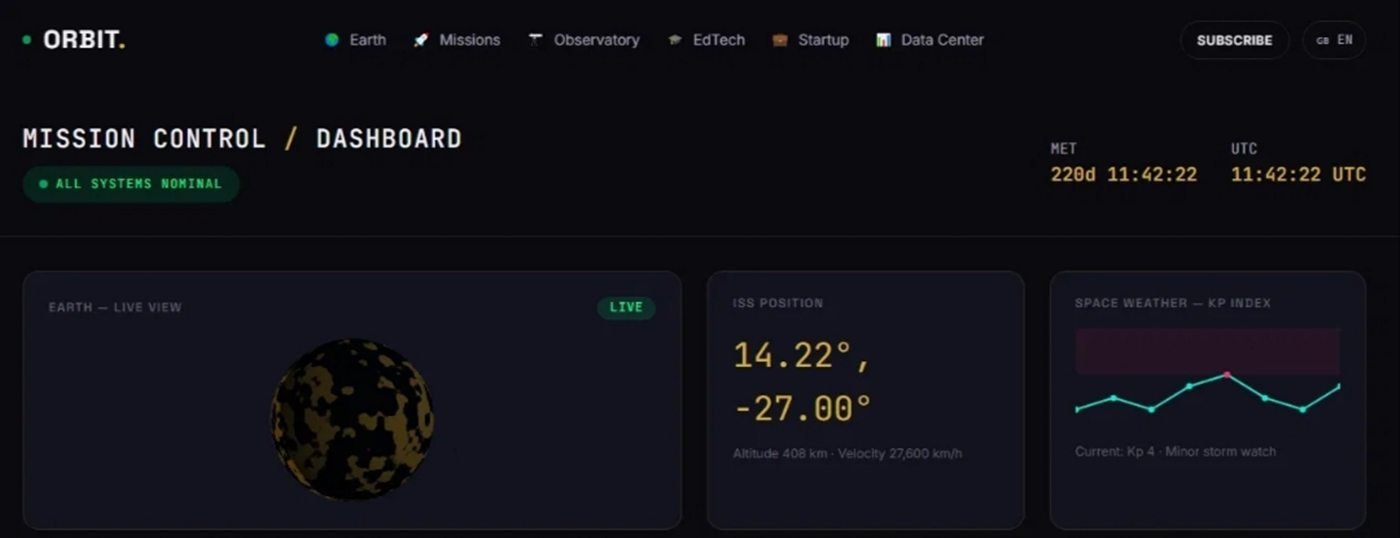
ORBIT includes dashboard-style interfaces designed to be connected to a buyer's own data sources.
In the supplied package, the dashboard page renders a mini Earth widget, an ISS position readout, a space-weather Kp-index line chart, active-mission status rows, an animated "satellites tracked" counter, an upcoming-launches list, CSS-based signal-strength bars for a "deep space network" panel, and a scrolling transmissions ticker. Every widget in that list currently runs on sample or simulated values — the counter animates, the chart draws a plausible line, the ISS coordinates update on a timer — but none of it is a live feed.
The included dashboard documentation describes exactly how a developer would replace that: create a small data-fetching module that pulls from a real source (the docs point to NASA's open API, the community SpaceX API, Open Notify for ISS position, and NOAA for space weather) and update the same DOM hooks the sample widgets already render into, rather than rebuilding the interface. That's a sensible, low-friction pattern, and it means the actual frontend work — the layout, the chart rendering, the status-pill styling — is already done before a developer writes a single line of API integration code.
Observatory / Sky Interface
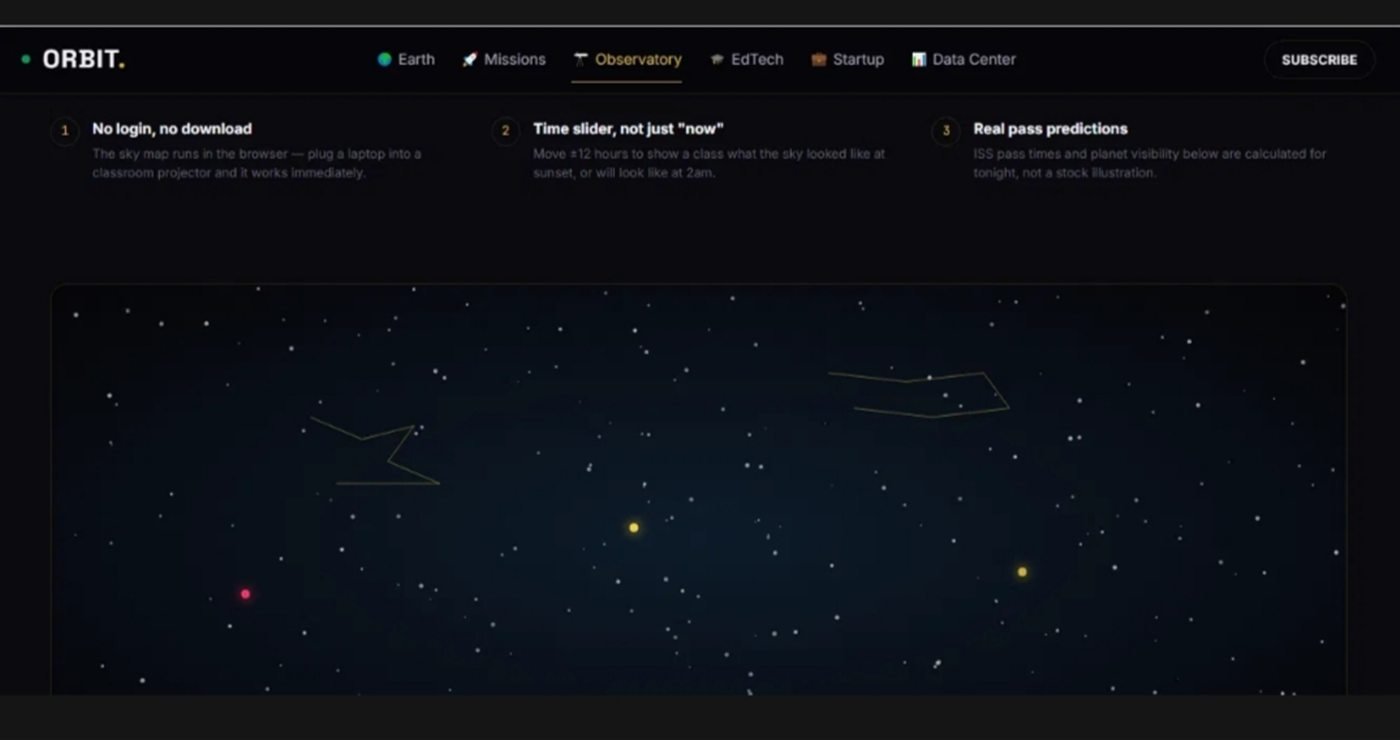
ORBIT's observatory page — an interactive sky map built for astronomy education and outreach.
The observatory page presents an interactive canvas sky map with constellation outlines and a time slider that shifts the display roughly twelve hours in either direction. It's a genuinely nice interaction for astronomy education contexts — a classroom projector, a science-outreach site, or an astronomy community page could put this in front of an audience with no login and no download, exactly as the product's own marketing describes it.
One clarification worth making plainly: in the supplied source, the sky map's motion is implemented as a simulation rather than an astronomically calculated ephemeris — the code that drives star and planet positions is explicitly written to approximate hour-by-hour sky motion, not to compute real positions for a given location and date. The visual result is convincing and the interaction model is well built, but treat it as a strong interactive frontend for a sky map, not as a verified, science-grade prediction tool, unless you replace the underlying calculation yourself.
Data Center & Dashboard Components
The data-center page pairs a sortable satellite table with chart components, giving a developer working tables, filtering-ready markup and chart rendering without starting from an empty page. Combined with the dashboard widgets described above, this is where ORBIT's "not just a template" pitch is most concrete: tables, charts, status panels and specialized data-display UI are exactly the kind of components that take disproportionate design and development time to get looking coherent, and they're already styled consistently with the rest of the package here.
For a developer estimating the value against the $120 price, this is the section worth weighing most heavily — a competent frontend developer building an equivalent dashboard-plus-data-table system from scratch, styled to a similar standard, would reasonably bill more than the cost of the entire template for that work alone.
Sample Data vs. Live Data
ORBIT's interactive demos use sample and simulated data. That distinction matters, but it is normal for this kind of frontend template: ORBIT provides the presentation layer, while production APIs and backend services are supplied by the buyer. The package's own positioning is upfront about this rather than hiding it, which is the right way to sell a template of this kind.
Customization
Because ORBIT is plain HTML, CSS and JavaScript with no framework and no build step, customization happens directly in readable source files: branding, color values, copy, imagery and page structure are all editable without a compile step getting in the way. The CSS is split by base tokens, components and layouts, and the JavaScript is split by feature (Three.js objects, dashboard widgets, data-center logic, i18n), which keeps the "change one thing without breaking three others" risk lower than a monolithic stylesheet would. Swapping the sample data and wiring in real APIs or a backend is left to the buyer, as covered above, and is realistically the biggest remaining task for anyone taking this to production.
How Easy Is It to Use?
For a working web developer, ORBIT is close to plug-and-play: clone it, serve it locally, start editing. For someone comfortable hand-editing HTML and CSS but less confident in JavaScript, it's manageable — most day-to-day customization (text, colors, images, page order) doesn't require touching the Three.js or dashboard logic at all. For a complete beginner expecting a drag-and-drop site builder, it's probably not the right fit; the setup guide is explicit that the pages must be served over a local web server rather than opened directly as a file, since ES modules and the i18n system are blocked under the file:// protocol, and that's the kind of instruction that will read as unfamiliar to a non-developer.
None of that is a mark against the product — it's built for developers and treats them as the audience, which is the right call for a $120 source-code template rather than a no-code page builder.
Documentation
The supplied package includes written guides covering setup, customization, the Three.js scene, the dashboard widget system, offline/service-worker behavior and RTL/language support. They're specific rather than generic — the Three.js guide gives exact file paths and variable names for adjusting Earth rotation speed, satellite orbits and star count, and the dashboard guide documents which widgets already exist and how to wire a new one into the grid. A separate dependency audit in the docs folder is worth calling out on its own: it discloses that the template's stock space photography is real NASA, ESA and Hubble imagery, sourced from Wikimedia Commons and hotlinked rather than stored locally by design, with a documented path to localize those images later. That kind of transparency about what's stored where is more thorough than most template documentation bothers to be.
Who Should Buy ORBIT?
ORBIT makes the most sense for developers working on space-adjacent projects, space startups that need an investor-facing site without hiring a design team, astronomy or science-education platforms, satellite or space-data visualization projects, astronomy creators and communities, astrophotography-adjacent platforms, and developers building space-sector sites for clients. If any of those describes the project in front of you, the frontend work already finished here is directly usable rather than merely decorative.
Who Should Skip It?
ORBIT is a weaker fit for someone who only needs a single basic landing page, anyone expecting a complete hosted backend or SaaS rather than source code, anyone expecting live satellite APIs to be included out of the box, and anyone who can't edit code and doesn't have access to a developer.
Is ORBIT Worth $120?
$120 is expensive if all you need is a homepage. It looks very different if your project needs a multi-page space interface, a dashboard system, working Three.js components, RTL support and several specialized page types already built. Recreating even part of that frontend from scratch — the Earth scene, the dashboard widgets, the data tables, the bilingual RTL layout — could easily consume more design and development time than the template costs outright, before a single API is connected.
For its intended audience — not everyone, and not every project — $120 is defensible and, on the evidence in the supplied package, potentially good value.
Final Verdict
ORBIT's biggest strength is its specificity. It is not simply a generic template with a space background added to it; it gives developers a substantial, already-built starting point for genuinely space-focused digital experiences, from the Earth scene down to the RTL layout rules on a timeline component. If a project actually needs this type of frontend, ORBIT can save enough design and development time to justify its $120 asking price.
Recommended for the right buyer.
Frequently Asked Questions
A premium HTML/CSS/JavaScript frontend template for space-themed websites. It ships with 14 HTML page templates (including dedicated 404 and Coming Soon pages), local Three.js 3D visuals, dashboard-style interfaces and English/Arabic RTL support, sold as a one-time $120 download by developer Shehab Essam under the name NebulaForge.
No. ORBIT is a frontend template. Its satellite, Mission Control and observatory-style interfaces run on sample and simulated data to demonstrate what the layout looks like in motion — it is not a hosted tracking subscription or a live data feed.
No. ORBIT ships with sample and simulated data wired into its widgets. Connecting real APIs (NASA, SpaceX, ISS position, NOAA space weather, or your own backend) is left to the buyer, and the included documentation outlines a pattern for doing so.
Yes. The purchase includes full, unminified HTML, CSS and JavaScript source, organized by page, component and feature, with no build step required to run or edit it.
Yes. Because it's plain HTML/CSS/JavaScript with no framework or build tool, branding, colors, copy, imagery and page structure can all be edited directly. Connecting it to live data requires basic JavaScript/API integration work.
It's friendly to anyone comfortable editing HTML, CSS and some JavaScript. It is not a drag-and-drop website builder, so a complete beginner with no code experience and no access to a developer will likely find it harder to use than intended.
For a developer, creator or organization that specifically needs a space-focused multi-page frontend with dashboards and Three.js work already done, $120 is a reasonable price given the amount of design and development it replaces. For someone who only needs a single basic landing page, it's harder to justify.